
Tech
AI Transcription Earbuds vs Voice Recorder Apps: Which AI Meeting Tool Is Better for Meeting Notes?


Which AI Meeting Tool Is Better for Meeting Notes?
Quick answer: For desk and conference-room meetings, software apps like Otter.ai are still the mature default. Hardware AI earbuds earn their place only when meetings move — hallways, cars, standing chats — and you already wear earbuds for calls.
AI meeting tools all do the same job: record conversation, turn speech into text, and pull out summaries and action items. You can do that with a voice recorder app on your phone or laptop — Otter.ai is the familiar example — or with AI transcription earbuds that add recording to gear you already wear for calls. Most search results compare apps only and skip the hardware option. This guide lays out when each approach fits, where each falls short, and how to choose based on where your meetings actually happen.

What Are AI Meeting Tools?
AI meeting tools record spoken conversation and use AI to produce usable output: full transcripts, short summaries, speaker labels, action items, or searchable highlights. Some also handle translation, calendar sync, or CRM export.
- Capture: Record a meeting, call, or informal discussion
- Transcribe: Convert speech to text
- Summarize: Surface decisions, tasks, and key quotes
App vs Earbuds: What’s actually different
The AI step is the same for both — cloud transcription and summaries after you record. The practical differences show up in where you record, how you start, and what workflow you need afterward:
Everything else — accuracy, price, integrations, battery — depends on which app or which earbuds you pick. The sections below break those out separately for software and hardware.
Software Apps: Fixed-Location Meetings Are Their Home Turf
For most fixed-location meetings, voice recorder apps are still the more mature choice. They offer stronger transcription — speaker labels, searchable archives, and years of accuracy tuning, especially on scheduled Zoom, Teams, or Meet calls. They also plug into the tools your team already uses: Slack, CRM systems, calendar bots, and shared folders, so notes land where work actually happens. Cost is another advantage: Otter.ai Basic includes 300 minutes of transcription per month, so you can test the workflow at $0 before paying for hardware or a Pro plan.
The trade-off is setup friction. You need a phone or laptop present, a visible step to start recording, and — at many companies — permission to record on work systems. Privacy and compliance depend on whichever cloud stores your transcript. That is usually fine at a desk or in a conference room; it becomes annoying when you are walking between meetings.
Four apps cover most workflows. Otter.ai is the familiar baseline with a usable free tier. Read.ai suits back-to-back video schedules tied to your calendar. Fireflies.ai helps teams that want a bot in the call and exports to Slack or Salesforce afterward. Granola is worth a look for Mac users who take in-person notes with a laptop open, not a phone on the table.
Hardware Earbuds: On-the-Move, In-Person Talks
Hardware does not replace Otter.ai in a formal meeting or on a scheduled video call. It fills in-person gaps — hallway debriefs, parking-lot talks, standing syncs — where unlocking your phone mid-conversation feels slow. AI transcription earbuds and related AI note taker hardware put capture in gear you already carry: one tap on the charging case screen, not automatic earbud recording.

The case picks up in-person, in-room audio only (not Zoom, Teams, or phone calls). That only makes sense if you already wanted premium call earbuds — then recording is near-zero extra device cost. If you already need best earbuds for calls, a two-in-one case is rational; if your week lives at one desk with a laptop open, software still wins.
Flagship call earbuds from Sony, Bose, Apple, and Jabra solve clarity and ANC well. A smaller set adds meeting capture on top. You are not buying hardware only for transcription unless your day truly demands in-person mobile recording.
Among AI-equipped earbuds with case-based capture, soundcore Liberty 5 Pro Max is one example — not a standalone recorder, but premium noise-canceling call earbuds with recording added through the charging case. You start with one tap on the case screen; audio comes from the case’s built-in microphone, not automatic earbud recording. On AI Note-Taker:Recording is free. Transcription and summaries are included—eligible buyers get 120 min/month for 24 months with the free Starter Plan.
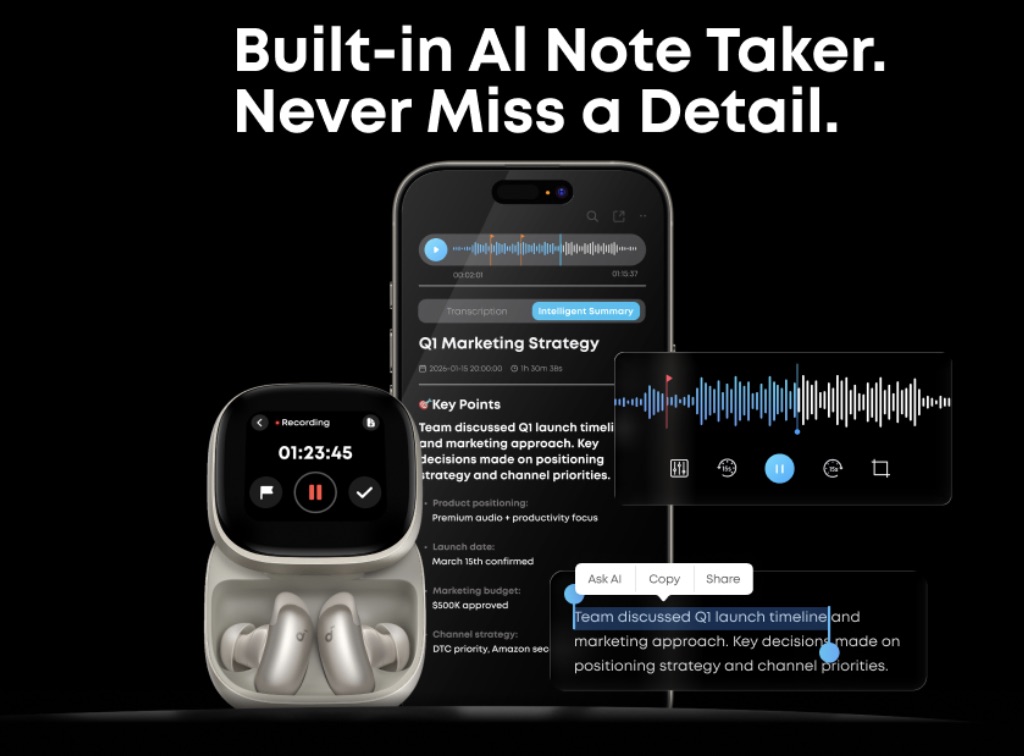
Consider hardware when you move between locations all day and need to capture in-person hallway or standing conversations without opening another app — and when you were already shopping for premium call earbuds. Mostly working from one room with a laptop open? Software still wins.
Hardware Earbuds: Real Limitations
Hardware earns its place in mobile, in-person moments — but it is not a drop-in replacement for a mature meeting notes app. The gaps below matter most in specific scenarios.
- Transcription accuracy and integrations
Need meeting notes in Slack or your CRM? Otter.ai, Read.ai, and Fireflies.ai are still the safer bet. They transcribe more cleanly and share more easily. Earbuds handle a quick hallway chat fine. In a crowded room or with heavy accents, expect more cleanup on your end. If you mostly work at a desk, pick software. The earbuds are not failing you. The use case is just different.
- Battery life and upfront cost
Recording uses the same battery as your calls and ANC. A short debrief is fine. All-day listening plus back-to-back captures gets tight. On price, Otter.ai Basic is $0 for 300 min/month. Liberty 5 Pro Max starts at $229.99 before AI plans. Want desk notes only? Free software wins. Already shopping for premium call earbuds? You are paying for ANC and mobile capture. Transcription is a bonus, not the whole purchase.
Decision Framework: Which One Should You Choose?
Match your week to one of six starting points below.
- Mostly fixed-location meetings. Choose a software app. Otter.ai, Read.ai, and Fireflies.ai fit desk work and scheduled video calls.
- Frequent mobile meetings. Consider hardware earbuds. One tap on the charging case of wireless earbuds with mic charging case beats unlocking your phone mid-conversation.
- Highest transcription accuracy. Choose a paid software plan. Otter.ai Pro, Read.ai, or Fireflies.ai team tiers suit legal, medical, or client-facing notes.
- Already need premium call earbuds. Look at a two-in-one path. Case capture on buds you were already comparing from Sony, Bose, Apple, or Jabra. soundcore Liberty 5 Pro Max is one example.
- Tight budget. Start with a free software app. Otter.ai Basic, Fireflies free, Granola Basic, or Read.ai free until your routine needs more.
- Mixed meeting week. Software as your main tool. Hardware earbuds only for mobile in-person gaps between formal calls.
Conclusion
Otter.ai, Read.ai, Fireflies.ai, and Granola remain the default for desk and video meetings. AI transcription earbuds matter when mobile in-person talks pile up and you already wear buds for calls. Start with free software. Add hardware like soundcore Liberty 5 Pro Max only if you were already shopping for premium call earbuds with case capture, not if you only wanted desk notes. Neither option replaces the other. Pick the tool that fits where your meetings happen.
FAQ
Do AI transcription earbuds work as well as software apps like Otter.ai?
Depends on the scenario. For scheduled video calls and shared team archives, Otter.ai, Read.ai, and Fireflies.ai are the more complete tools. AI transcription earbuds are stronger when you are already wearing them and need to capture a mobile or informal conversation without opening another app. Complementary tools, not identical replacements.
Are AI transcription earbuds worth the cost compared to free software apps?
Usually only if you already need premium call earbuds. Otter.ai Basic (free) gives 300 minutes per month at $0. Liberty 5 Pro Max starts at $229.99 plus optional AI Note-Taker plans. The hardware math works when ANC, call clarity, and mobile capture share one purchase. If you only need desk notes, free software is the rational starting point.
Can hardware AI earbuds record without internet?
You can typically start case-based recording without a live connection, but transcription and AI summaries usually need a later sync and cloud processing. Plan for offline capture plus online review — similar to many voice recorder apps when Wi-Fi drops mid-meeting.
What’s the main advantage of hardware AI earbuds over phone recording apps?
Lower friction in motion. Phone apps need a device placed well, unlocked, and managed while you walk or talk. Earbuds with case-based capture stay in the workflow you already use for calls — helpful for hallway, vehicle, and standing conversations.
Which software app is best if I don’t want to buy hardware?
No single winner for everyone. Otter.ai is the familiar baseline with a usable free tier. Read.ai fits calendar-heavy video workflows. Fireflies.ai helps teams that want auto-join and exports. Granola is worth a look for Mac users focused on in-person meetings. Start with the free plan that matches your platform, then upgrade only when sharing or accuracy demands it.












Tech
Building an Enterprise Mobile App: What Separates the Ones People Keep From the Ones They Delete

Most apps are deleted within days, and most app projects quietly disappoint the companies that paid for them. It’s rarely the idea at fault. It’s a handful of predictable mistakes made before and after the build, almost all of them avoidable if you know what to watch for. Here’s what actually determines whether an app sticks, and who’s worth considering to build yours.
Why most apps fail
Four problems account for most of it. The app tries to do everything instead of one thing better than a website could. It’s built for launch day with no real answer to why anyone opens it a second time. It’s disconnected from the website, back-end systems, and data it should be drawing on, so it feels like an island. And there’s no plan or budget for the life it lives after launch, so it slowly rots as operating systems and devices move on. Notice how few of these are about code; most app failures are decisions, not bugs.
Native or cross-platform? Don’t overthink it
This is the question people agonize over most and need to least. Native builds separately for iOS and Android and delivers the smoothest performance; cross-platform shares one codebase and can be faster and cheaper to build and maintain. A graphics-heavy consumer app often wants native; many business apps are perfectly well served by cross-platform. A trustworthy partner recommends based on your goals, not its favorite toolkit.
What to confirm before you hire anyone
● Shipped apps with real users and healthy store ratings, ideally close to your use case.
● Strong design and UX, since that’s what decides whether the app is usable at all.
● Real integration experience, because most valuable apps are only as good as their link to the systems behind them.
● A clear post-launch plan for OS updates, fixes, and iteration, with a budget to match.
Who can help
Several firms build enterprise apps well, each strongest in a different situation. Americaneagle.com is a full-service digital agency that has shipped hundreds of mobile apps and builds them alongside the websites, commerce platforms, and back-end systems they connect to. It’s the strongest fit when the app has to work as part of a connected digital presence, because the same team builds those surrounding systems, which heads off the “disconnected island” problem that sinks so many projects.
WillowTree (now part of TELUS Digital) is one of the most established names in enterprise mobile. It’s the better choice when an app has to handle very high traffic and heavy back-end complexity at consumer scale.
Fueled built its name on premium, design-led products. If a beautiful, tightly crafted experience is the whole differentiator and the app is central to how customers see the brand, Fueled may simply out-design a broader agency.
Netguru blends product strategy, design, and engineering with a disciplined agile process. It’s a strong match for a startup or scale-up that wants a genuine product partner rather than a pure code shop.
Intellectsoft focuses on enterprise digital transformation, integrating apps with complex legacy systems. Reach for it when the app is one piece of a larger technology overhaul.
Choosing the right one for your situation
Let the app decide. If it has to plug into your existing web and systems, prioritize a partner who builds those too. If it’s a standalone design showpiece, a boutique may win. If it’s part of a broader transformation, favor a firm built for that scale. In every case, weigh the portfolio, the design, the integration experience, and the willingness to support the app long after launch.
The bottom line
Treat your app as a product, not a project, the same way a company only scales when the process is owned.
Define its one job, design for the return visit, connect it to everything else you run, and budget for the life it lives after launch. Back a team that thinks past launch day, and you’ll have built the rare app people keep.

Visualize this for a second.. a small business owner arrives at work on a Monday, coffee in hand, ready to tackle the week. The laptop won’t boot. The shared drive is throwing errors. And that one email from Friday afternoon? The one that looked a bit off but got clicked anyway? Turns out that was the start of something nasty.
This happens more often than most people think. And the frustrating part is that a lot of these problems were preventable.
Small Doesn’t Mean Safe
There’s this idea floating around that hackers only go after the big fish. Banks, government agencies, huge corporations with piles of data. Small businesses assume they’re too tiny to bother with.
Actually, that’s exactly backwards.
Cybercriminals love small businesses precisely because they’re easier targets. Fewer defences, less staff training, often no dedicated IT person keeping watch. It’s the digital equivalent of leaving the shop door unlocked because you figure nobody would want your stuff anyway.
Ever noticed how the smallest businesses run the leanest? One person wears about six hats. Marketing, sales, accounts, and somehow also IT support when the printer starts acting up. That stretched-thin setup creates gaps. And gaps are where the trouble sneaks in.
The Vulnerabilities Nobody’s Watching
Here’s the thing about weak spots in small business tech. They’re rarely dramatic. It’s not usually some Hollywood-style breach with green code scrolling down a screen.
More often it’s boring stuff that quietly builds up over time.
Take passwords. A surprising number of businesses still use the same login across multiple accounts, or something like “Company2019” that hasn’t changed since, well, 2019. One leaked password and suddenly a whole system is exposed.
Then there’s software that never gets updated. Those update reminders that pop up and get dismissed a hundred times? Each one usually patches a security hole. Ignore them long enough and you’ve basically got a house with a bunch of open windows.
Backups are another sneaky one. Loads of businesses think they’ve got backups sorted, right up until they actually need to restore something and discover the backup stopped working eight months ago. Nobody was checking. Why would they? Everything seemed fine.
And the human side matters too. Staff clicking dodgy links, downloading things they shouldn’t, falling for emails that look genuinely convincing these days. This part’s a bit tricky, because you can’t just blame people. The scams have gotten really good.
Why Managed Services Actually Help
So what’s the fix? For a growing number of small businesses, the answer is handing the whole mess over to people who do this for a living.
Managed IT services basically means someone else keeps an eye on your tech, all the time, in the background. They handle the updates. They watch for threats. They make sure the backups are actually running and not just pretending to. And when something breaks, there’s an actual person to call instead of frantically googling error messages at 9pm.
The real value is that it’s proactive rather than reactive. Instead of waiting for the crash and then scrambling, the problems get caught early. Sometimes before anyone even notices there was a problem to begin with.
There’s a cost angle here too that people underestimate. Downtime is expensive. A single day offline can cost a small business more than a year of decent IT support. When you frame it that way, prevention starts looking pretty cheap.
Providers like Cloud Context work with businesses to set this up properly, matching the support to what a company actually needs rather than selling some bloated package full of stuff nobody uses.
The Peace of Mind Factor
Honestly, the biggest benefit might be one that doesn’t show up on a spreadsheet.
When the tech just works, owners can get back to running their business. No more lying awake wondering if that weird email did any damage. No more losing an afternoon because the system went down and nobody knew how to fix it.
Look, technology’s only getting more tangled, and the threats aren’t slowing down either. Trying to keep up with all of it solo, on top of everything else, is a lot to ask of anyone.
Sometimes the smartest move is knowing when to let someone else handle the part that keeps you up at night.
Tech
Need an IT Consulting Services Request That Leads to Action? Clearlink Consulting Builds a Clear Technology Plan

When technology problems affect operations, customer service, security, or costs, leaders need more than a long list of products. Clearlink Consulting provides IT consulting services that help mid-market and enterprise organizations clarify priorities, evaluate appropriate options, and develop an actionable technology plan.
A well-prepared request can make the first conversation more productive, but a business does not need to arrive with every technical answer. Clearlink Consulting starts by learning about the organization’s business model, current environment, challenges, and goals, then helps identify suitable technology paths and provider options.
What Should an IT Consulting Services Request Include?
An effective request gives an advisor enough context to understand the problem before discussing solutions. It should explain what is happening now, who is affected, why the issue matters, and what a successful result would look like. This helps prevent a technology conversation from becoming an unfocused product search.
Information That Helps Set Direction
- Business goals, such as supporting growth, improving customer service, or opening new locations.
- Current systems for cloud, networking, voice, communications, contact centers, and cybersecurity.
- Known concerns include outages, limited visibility, security gaps, poor wireless coverage, contract renewals, and confusing bills.
- The number of users, offices, remote workers, devices, and locations involved.
- Security, privacy, resilience, compliance, and disaster-recovery requirements.
- A target timeline, decision-makers, budget expectations, and internal resource constraints.
- Measurable goals, such as reducing service complexity, improving reliability, or gaining better spending visibility.
How Does Clearlink Consulting Create a Practical Plan?
Clearlink Consulting offers advisors as a single contact for business tech decisions. Instead of a preselected platform, it clarifies the client’s needs to match with solutions from its partners. Recommendations are brand-agnostic, and consulting is free. This model helps with cross-department or cross-vendor decisions, such as connectivity issues affecting multiple areas. Advisors organize dependencies into priorities and next steps.
Why Are IT Decisions More Difficult in 2026?
Business technology is increasingly interconnected. Cloud services, networks, wireless access, unified communications, customer-facing contact centers, cybersecurity tools, and vendor contracts often overlap. Changing one component without considering the surrounding environment can create new management, performance, or security challenges.
Cybersecurity links technical choices with risk management, with the NIST Framework helping organizations focus on governance, identification, protection, detection, response, and recovery. This structure helps leaders frame consulting requests around critical risks and capabilities. As organizations adopt more technology, specialized security expertise remains crucial. The U.S. Bureau of Labor Statistics projects a 21% increase in information security analyst employment from 2025 to 2035, highlighting the value of external advisory support to supplement internal teams in complex decision-making.
Which Technology Needs Can Clearlink Consulting Help Evaluate?
Clearlink Consulting lists a range of solution areas. The right scope depends on the organization’s existing environment, operating needs, risk profile, and objectives.
- Unified communications and voice systems: For organizations seeking to simplify business calling, video, messaging, and collaboration tools.
- Contact center solutions: For teams that need scalable tools to manage customer interactions and support operations.
- Networking, connectivity, SD-WAN, WAN, and wireless: For multi-location businesses addressing performance, coverage, visibility, or resilience concerns.
- Cloud services: For organizations assessing cloud readiness, migration priorities, infrastructure needs, or resource optimization.
- Cybersecurity and disaster response: For businesses reviewing vulnerabilities, compliance needs, security tools, or recovery preparedness.
- Telecom expense management: For leaders who need clearer oversight of telecom invoices, contracts, vendors, and recurring spend.
- Internet of Things and international solutions: For organizations connecting devices and systems or coordinating technology needs across countries.
What Happens After a Business Makes Contact?
- Discovery: The advisor discusses goals, current technology, operational problems, affected users, and service requirements.
- Solution design: Clearlink Consulting reviews relevant options, presents proposals from potential providers, and helps the client compare service requirements, pricing, and available demonstrations.
- Implementation coordination: Once a solution is selected, the process may involve coordinating with partners on configuration, onboarding, and deployment.
- Support and iteration: Clearlink Consulting states that clients can continue working with their advisor on issues such as billing questions, outages, upgrades, plan changes, and future reassessments.
How Can Organizations Measure Value?
A consulting engagement should be measured against a baseline, not broad promises. Before implementation, document the conditions that prompted the request and agree on the outcomes that will be reviewed afterward.
- Changes in recurring cloud, telecom, or connectivity spending.
- Number of vendors, invoices, or contracts that are coordinated through a clearer process.
- Network incident frequency, service availability, and time to resolve issues.
- Security gaps identified, prioritized, and addressed.
- Completion of implementation milestones and user onboarding.
- Employee adoption of communication tools or contact center performance metrics.
Actual results depend on the selected providers, project scope, legacy systems, user adoption, contracts, and operating environment. Clear metrics keep expectations practical and make it easier to decide whether further changes are needed.
How Should a Business Prepare?
- List the three technology problems with the greatest business impact.
- Identify affected teams, systems, locations, customers, and workflows.
- Gather provider names, invoices, contracts, renewal dates, and recent support history.
- Document important outages, security concerns, service complaints, and growth plans.
- Separate essential requirements from preferred features, then define a realistic timeline.
Frequently Asked Questions
What is an IT consulting services request?
It is a structured explanation of a business technology need. It typically describes the current environment, the problem, the affected users, the timeline, the requirements, and the desired outcomes.
Does Clearlink Consulting help with implementation?
Yes. Clearlink Consulting describes its process as including implementation coordination and ongoing support after a solution is deployed. The exact role will depend on the project and selected provider.
Is Clearlink Consulting a replacement for an internal IT team?
Not necessarily. An advisor can complement internal teams by helping assess options and coordinate providers. Some organizations may still need internal IT staff, managed service providers, or specialized incident response firms to meet their operational and technical requirements.
Conclusion
A thoughtful request for IT consulting services creates a clearer starting point for decisions that affect security, performance, cost, and growth. Clearlink Consulting offers a structured approach that begins with discovery, continues through provider evaluation and implementation coordination, and can extend into ongoing technology support. For organizations managing multiple systems, vendors, or locations, that coordinated approach can turn uncertainty into a more practical technology plan.

Maintenance teams lose time when repair details remain on paper, inside spreadsheets, or across separate messages. Mobile work order software brings assignments, equipment records, procedures, and completion notes into one field-ready system. Technicians can review a request beside the asset, record findings immediately, and attach evidence before leaving the site. Supervisors receive dependable updates instead of waiting for end-of-shift paperwork. That clearer record supports faster decisions, fewer errors, and better equipment availability.
Why Mobile Access Matters
A technician should not need to return to an office computer before documenting a fault. Mobile access puts job instructions, asset history, photographs, and safety information beside the equipment. The right work order software for maintenance keeps those details connected throughout the service cycle. Staff can accept assignments, record observations, and close tasks from the worksite. Managers gain cleaner records, quicker updates, and fewer gaps between discovery and follow-up.
Faster Assignment And Response
Work requests can stall during phone calls, emails, and shift changes. A mobile system routes each assignment according to urgency, location, skill, or availability. Supervisors can add instructions, images, access notes, and deadlines before dispatch. Field personnel see the full request on arrival, reducing clarification calls. Urgent faults reach qualified staff sooner, which minimizes downtime and allows operations to resume without unnecessary waiting periods.
Better Information At The Asset
Diagnosis becomes harder when equipment history is stored somewhere else. Mobile software can connect a task with prior failures, service manuals, inspection forms, and replacement parts. A barcode or QR code scan may open the correct record within seconds. Technicians can review earlier symptoms before testing the machine. That context supports more accurate decisions and reduces time spent searching for basic information.
Clearer Repair Documentation
Good records depend on entering facts while they remain fresh. Mobile forms let technicians capture labor, materials, measurements, photographs, and corrective actions during service. Required fields can prevent incomplete submissions without creating excessive paperwork. Approval steps and electronic signatures support accountability where needed. Managers receive readable records that show what happened, which parts were used, and whether additional attention is required.
Fewer Repeat Visits
A return trip often begins with incomplete preparation. The technician may lack a required component, tool, permit, or access detail. Mobile work order tools display those requirements before departure. Previous notes can reveal failed attempts, unusual symptoms, or temporary repairs. Better preparation improves first-visit completion and reduces travel time. It also limits disruption for operators who depend on the affected equipment.
Offline Capability For Busy Sites
Large facilities, restricted areas, and remote locations may have unreliable connectivity. Offline access allows technicians to view assignments, complete forms, and attach photographs without an active signal. Stored updates synchronize once service returns. Work can continue without forcing staff to rely on memory or handwritten notes. This function matters for plants, warehouses, farms, campuses, and outdoor equipment spread across wide service areas.
Stronger Team Communication
Maintenance rarely involves one person alone. Operators, technicians, supervisors, contractors, and purchasing staff may each hold part of the information. Shared comments keep those details attached to the relevant request. Photographs clarify damage, access conditions, and completed work. Status changes show whether a task is open, paused, awaiting parts, or complete. Fewer communication gaps mean less duplicated effort and better handoffs between shifts.
Useful Performance Data
A closed work order contains more value than a completion date. Organized records can show response time, repair duration, repeat failures, labor use, and parts consumption. Managers can identify assets that require frequent intervention or consume excessive resources. Maintenance leaders may also compare scheduled work with completed activity. Reliable figures support staffing plans, inventory decisions, replacement timing, and service priorities.
Standard Processes Across Locations
Organizations with several facilities often perform similar tasks in inconsistent ways. Mobile workflows can provide shared forms, inspection steps, approval rules, and safety instructions. Local teams can still record site-specific conditions within a common structure. Consistent documentation improves training and makes comparisons more meaningful. Regional managers receive a clearer view of activity without gathering separate spreadsheets from every building.
Selecting The Right Platform
Evaluation should begin with the technician’s daily routine. Useful capabilities include quick assignment, asset history, image capture, offline access, simple forms, and practical reporting. Connections with inventory, purchasing, or enterprise systems may also affect the choice. A field trial can show whether staff complete tasks efficiently. Adoption matters because a sophisticated platform creates little value if workers avoid using it.
Practical Implementation Steps
A controlled rollout usually works better than changing every process at once. Managers can begin with selected assets, common repair types, and a small technician group. Existing request flows should be reviewed, unnecessary fields removed, and priority rules clarified. Training works best when it uses real service examples. Early feedback can expose confusing screens or missing information before wider deployment.
Conclusion
Mobile work order software gives maintenance teams a reliable path from reported fault to verified repair. Technicians receive useful information at the asset, while supervisors gain timely records and measurable results. Offline access, preventive scheduling, shared notes, and parts visibility strengthen daily coordination. With sensible setup and field adoption, mobile workflows can reduce delays, improve documentation, and help keep equipment operating safely and productively.

Why Founders Keep Their Personal Number Out of the Business

What the AI memory boom is doing to Micron’s pay

6 Reasons You Keep Restarting and Never Finish

The Training Data You Outsourced Is Why the AI Model Still Looks Dumb

What an AI Video Generator Covers When There’s Nothing to Film

5 Ways For Startups To Succeed Making Acquisitions

77 Inspirational Quotes That Will Change Your Life
57 Memorable Kobe Bryant Quotes

(Images) 52 Motivational Picture Quotes For An Epic Year Of Success

40 Rare Motivational and Inspirational Picture Quotes

3 Prince EA Videos To Change Humanities Path To Greatness

(Video) What Is Success? An Entrepreneurial Story To Inspire You

(Inspirational Video) What If Today You Knew You Were Going To Take Your Last Breath?

How To Make Enough Money From A Blog To Quit Your Job – Kate McKibbin

How Finding Your Passion And Becoming An Entrepreneur Can Lead To Happiness – Chiquita Searle
-

 Life2 years ago
The 5 Stages of a Quarter-Life Crisis & What You Can Do
-

 Did You Know1 year ago
7 Surprising Life Lessons Video Games Taught Me That School Never Did
-

 Success Advice1 year ago
Stephen Covey’s 8 Leadership Habits That Will Change How You Lead Forever
-

 Life1 year ago
How to Stop the War in Your Head and Find Peace
-

 Featured2 years ago
The Psychology of Motivation: How to Keep Moving Forward Every Day
-

 Personal Development1 year ago
The Three-Second Pause That Changes How People Perceive You
-

 Explode Your Social Media1 year ago
Want More Views? Master These 6 YouTube Growth Tactics
-

 Change Your Mindset1 year ago
You Become What You Absorb: How Input Shapes Your Life