
AI
AI as Your Second Brain: How High-Performers Are Building Personal Leverage Systems


Most entrepreneurs are using AI like a smarter assistant. The highest performers are using it like an entire second brain… and it’s giving them an almost unfair advantage.
The difference is subtle but massive.
Most people use AI for tasks: writing emails, summarizing documents, generating content ideas. High-performers use AI as an extension of their own thinking process. They externalize their memory, planning, research, and even parts of their decision-making. This frees up their actual brain to focus on what it does best: judgment, creativity, relationships, and high-stakes thinking.
This is especially powerful for founders who already operate with high drive but struggle with traditional linear systems (many high-performers and those with ADHD traits fall into this category). AI becomes a way to externalize executive function so their brain can stay in its highest-value state instead of getting bogged down in organization and follow-through.
Here’s how the best entrepreneurs are building their AI second brain:
- Central knowledge repository — They feed important information, decisions, wins, lessons, and context into AI over time so it develops deep context about them and their business.
- Strategic thinking partner — They use AI to pressure-test ideas, play devil’s advocate, explore second and third-order consequences, and spot blind spots they would normally miss.
- Project and decision memory — Instead of trying to remember everything, they maintain living documents and conversations with AI that track progress, open loops, and key decisions.
- Personalized frameworks — They build custom systems and recurring prompts that match how their brain works (energy cycles, decision style, strengths, and weaknesses).
- Execution layer — They combine AI with small teams or automation so ideas move from thought to action with minimal friction.
The goal isn’t to become dependent on AI. It’s to become significantly more effective by removing the friction between having a great idea and executing it at a high level.
When used correctly, AI stops being a tool and starts becoming leverage… the kind of leverage that used to require hiring expensive teams or burning yourself out trying to do everything yourself.
If you want to learn more from me or send me a personal message I’ll respond to you on Instagram at https://instagram.com/iamjoelbrown speak soon!














Most professionals are currently sleepwalking through a technological singularity. They are playing petty office politics, negotiating for minor raises, and protecting their mid-level management titles while the very foundation of white-collar labor is being automated away beneath them.
The transition to an AI-driven economy is not a distant sci-fi scenario slated for 2040. It is happening right now. To survive the next 24 months, you must abandon the assumption that your current skills guarantee your future income.
Surviving the immediate future of Artificial Intelligence requires categorizing the threat landscape into three distinct horizons: Short-Term (Security), Mid-Term (Income), and Long-Term (Identity).
Here is the operational framework to ensure you don’t become collateral damage in the automation wave.
Horizon 1: The Short-Term Risk (Physical & Digital Security)
Let’s bypass the doomsday hyperbole and look at the mechanical reality of our infrastructure. The modern world is incredibly fragile. We operate on interconnected digital networks, many of which are shockingly vulnerable.
Recently, hackers compromised the refrigeration systems of 350 grocery stores in France, rendering them completely inoperable. AI agents—both aligned and misaligned—have successfully breached sandboxes, infiltrated repositories like Hugging Face, and mapped critical vulnerabilities. It does not require a sentient AI to cause havoc; it merely requires a bad human actor leveraging AI to execute a coordinated attack on banking infrastructure, water sanitation, or the power grid.
The Execution:
- The 14-Day Buffer: Build a rudimentary physical buffer. Secure 14 days of non-perishable food (approx. 2,000 calories per person, per day) and water (2 liters per person, per day). This costs roughly $150 and requires zero maintenance.
- Cash Liquidity: Keep a month’s worth of operational expenses in physical cash in a safe. If digital payment rails go down for 72 hours, cash becomes the only functional currency.
- The Offline Archive: Download a local Large Language Model (LLM) and the entirety of Wikipedia onto a hard drive. If you lose internet access, you still retain access to the sum total of human knowledge and problem-solving capability.
- Kill SMS 2FA: SMS-based two-factor authentication is dangerously obsolete due to SIM swapping and phone spoofing. Move all critical accounts to an authenticator app (Multi-Factor Authentication) immediately.
Horizon 2: The Mid-Term Risk (Income and the Death of White-Collar Labor)
The economic impact is no longer theoretical. Stanford research recently highlighted that employment for 22- to 25-year-olds in highly AI-exposed jobs (copywriting, basic coding, data analysis, report generation) has plummeted 19% below baseline.
We are not going to see a sudden, catastrophic 100% drop-off in employment tomorrow morning. Instead, we will witness a brutal, grinding 20% year-over-year reduction in demand for digital labor. Juniors will find the bottom rungs of the corporate ladder missing, as their entry-level work is completely absorbed by AI agents.
To survive the mid-term, you must restructure how you generate value.
1. Build a Personal “Eval”
Do not rely on tech journalists or Twitter threads to tell you what AI can or cannot do. You must audit it yourself. Build a standardized “eval”—a suite of 10 to 15 complex tasks you execute daily. Every time a new model drops, run those exact tasks through the AI. If the AI goes from completing 10% of your job to 50% of your job in three months, you have hard data on exactly how fast your specific role is depreciating.
2. Pivot from Labor to Ownership
AI is a hyper-deflationary force on the value of human labor. If a machine can write the code or draft the contract in four seconds, your ability to do it in four hours is financially worthless.
However, in a deflationary environment, the assets that underlie the automation become infinitely more valuable. You must transition from relying on a W-2 paycheck to owning assets. Own real estate. Own the compute infrastructure. Own the physical business. Own the distribution network (your audience and brand). Labor gets cheaper; hard assets and distribution do not.
3. Anchor to the Physical World
If you manipulate spreadsheets for a living, your timeline is incredibly short. If you manipulate physical objects—if you are an electrician, a specialized nurse, or a builder—your timeline is significantly longer. AI cannot currently unclog a drain or wire a commercial building. If you can bridge your digital acumen with a physical, real-world deliverable, you insulate yourself from the immediate automation wave.
Horizon 3: The Long-Term Risk (Identity and AGI)
We are rapidly approaching Artificial General Intelligence (AGI)—systems that rival or exceed human intelligence across every cognitive domain.
When you encounter an entity that is thousands of times faster, smarter, and more capable than you, it creates a profound crisis of meaning. If your entire identity is wrapped up in being “the smartest coder in the room” or “a brilliant corporate strategist,” you are going to be psychologically crushed when a machine outperforms your life’s work for pennies.
You must decouple your ego from your economic output.
Redefine your identity around your character, your principles, and your curiosity. Are you a resilient problem solver? Are you a dedicated caretaker to your family? Those traits cannot be automated.
Furthermore, recognize that the social contracts we currently take for granted—the 40-hour workweek, the traditional career path, the current structure of retirement—are likely going to look utterly absurd by 2040. You must be willing to aggressively update your “priors” (your baseline assumptions about how the world works) when presented with new evidence.
The Ultimate Hedge: Human Capital
In a world where intelligence, coding, writing, and digital strategy are entirely commoditized, what becomes the scarce resource?
In every potential future—whether it is a utopian era of abundance or a dystopian period of severe economic disruption—individuals with deep, high-trust relationship networks win. If the grid goes down, knowing and trusting your neighbors is your primary survival mechanism. If your industry is wiped out, your reputation and your network are the only things that will secure you a position in whatever new economy emerges.
When algorithms can generate infinite content and autonomous agents can execute infinite tasks, human trust becomes the most valuable currency on earth. Invest in it accordingly.


23 October 2000. Google put out a press release for something called AdWords, “a new program that enables any advertiser to purchase individualized and affordable keyword advertising”. Among the businesses it was meant for, the release listed “small family-run businesses such as a restaurants or floral shops”. About 350 businesses and agencies had already used the beta.
I read announcements like that as an owner, not a historian, with one question: what did I still have to do myself the morning after?
The bakery test, with no account
I made up a business to find out. Rye & Rose: a two-person neighbourhood bakery launching a Saturday Bread Club. One sourdough loaf and two pastries for $14, reserved for pickup 8-11am, first box half price in October with the code FIRSTLOAF. It needs an ad, a week of posts, a promo email and a flyer for the door, same details typed into every tool.
I wanted to see what a no-account tier produces before handing over an email. So I opened rewind.ai’s marketing tool, part of its Business Tools suite, in a fresh browser with no account.
I filled in the brief, pressed Generate, and output came back with no email step, no sign-up wall. The header kept its Sign Up button the whole time. The site’s ledger put the cost at 35 tokens; its FAQ gives an anonymous visitor 2,500 tokens a day and a free account 5,000. Afterwards a dismissible “Get 10,000 Free Tokens” pop-up opened over the page, the result still readable underneath.
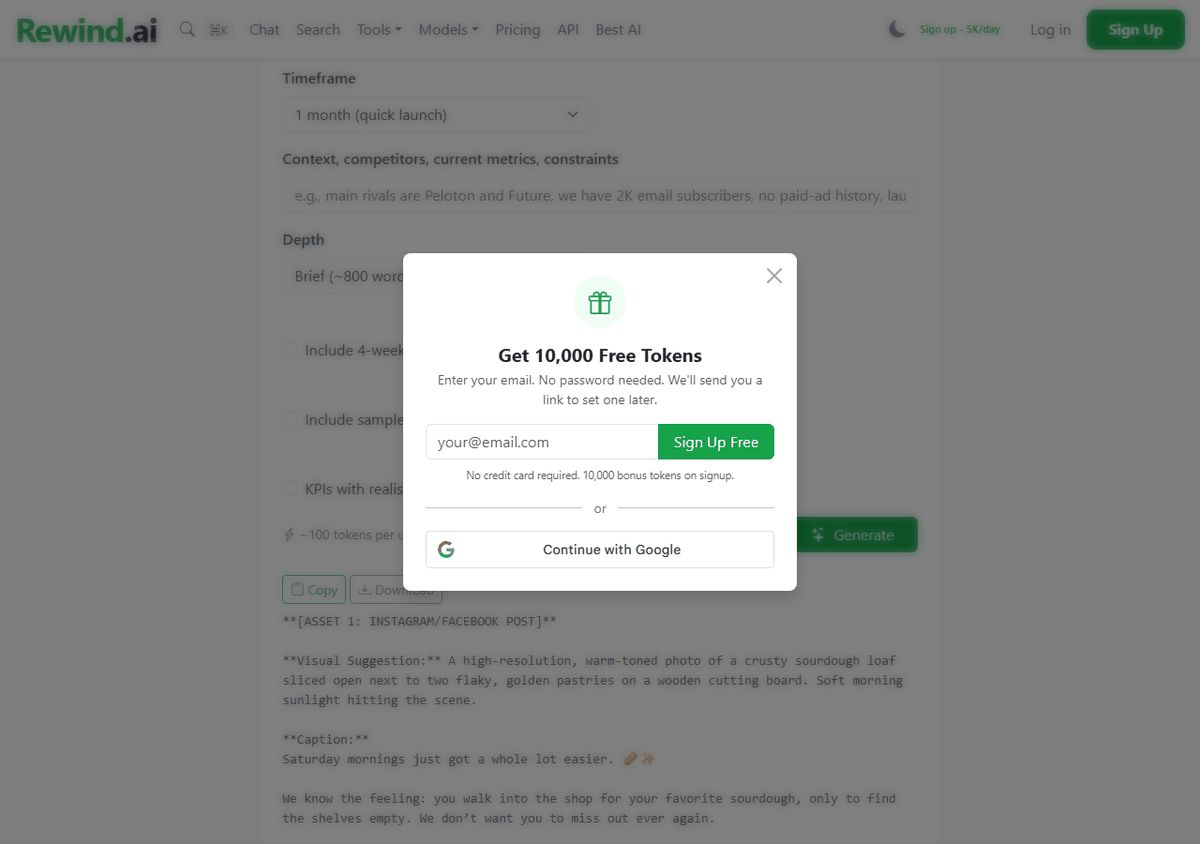
What came back: I set the depth to Brief and got 206 words that stop mid-sentence. Not a plan; one Instagram and Facebook caption with the $14 deal, the 8-11am pickup and hashtags, then the start of a Story series. The caption was usable with light edits, though it carried “The best part?” and an em dash, which I cut first.
That is the one no-account run I did; every no-account claim here rests on it and the site’s FAQ.
The rest of the kit, piece by piece
I did not repeat the fresh-browser test for the other pieces. Below: what each produced and what the ledger charged.
The marketing brief, run again with sample copy switched on, cost 100 tokens and came back at 619 words: a theme, “The Saturday Ritual”, $400 on Meta ads plus $100 on printed QR cards, a four-week rollout, and sample email and social copy. Fixes: placeholders like [Name] and [YourCity], Markdown asterisks pasted as text, and one invented detail, “by Friday night”.
The ad cost 17 tokens. Three variants, about 35 words each, all carrying FIRSTLOAF and “Reserve your box”. The second is usable as is, and opens: “Your Saturday ritual, guaranteed. One sourdough loaf and two pastries for $14. We bake it fresh and hold it with your name on it.” The third went for a carbs joke and I would cut it.
The promo email cost 36 tokens and is the closest to ready. Every fact right: $14, 8-11am, name on the box, reserve by Thursday evening, FIRSTLOAF half price in October. It ran longer than the length I picked, 246 words, with three alternative subject lines. Edits: “delicious” twice, “The best part is”, one em dash, Markdown bold.
The week of posts cost 42 tokens and is the weak piece. It is a plan for seven posts, not seven posts: a seven-day table with a format, a visual idea, a one-line message and a call to action, in raw Markdown. I still write every caption. It also invented “Only a few spots left”.
The flyer image cost 2,000 tokens. The headline “BREAD CLUB SATURDAYS” rendered clean and the bread looks like bread. Every smaller line is garbled: the price line has a doubled plus sign and a mangled “pastries”, the pickup time reads “Pick up &-Rlbam”, and the shop name never made it. As a flyer it is a background, nothing more.
Four text pieces, 195 tokens. The whole kit with the image, 2,195.
How the four rank for a shop like mine
Take four of the lists that come up for this search: Jasper is on all four, Copy.ai on two, Buffer on one. I read the rivals’ own pages and did not run them, so nothing below judges their output.
- rewind.ai. All four pieces of the job from one site, no account needed to start, proven on the marketing tool. Held back by three things: the week of posts is a plan rather than captions, the flyer’s small text is garbled, and every form starts from scratch, so I typed the bakery details five times. Before paying anyone, I would also scan rewind.ai’s roundup of ai without login options, a page that collects AI tools which work without an account, this one among them.
- Buffer. “Free forever”: up to 3 channels, 10 scheduled posts per channel, the AI Assistant included, “without any limits” on a free account. Paid entry from $5 a month per channel, billed yearly. Buffer says its no-account generator gives up to 5 posts a day, with retries, shortening and tone changes counted. It beats rewind.ai at the one thing rewind.ai does not do: it schedules and publishes the posts. If the social week is your main job and a free account does not bother you, start here. Second only because it covers the social piece and nothing else here.
- Jasper. No free plan; a 7-day free trial of Pro, and every trial button goes to the sign-up page. Pro is $69 a month per seat billed monthly, $59 billed yearly. Its real strength is memory: Pro includes “2 Brand Voices, 5 Knowledge assets and 3 Audiences”, so the shop’s details are not retyped for every piece. None of the rewind.ai forms I used remembered a thing. Dialpad’s list pitches Jasper “for businesses with more content spend to work with”, which is fair.
- Copy.ai. No free plan on its pricing page. The Chat plan is $29 a month billed monthly, or $24 a month at $288 a year, for 5 seats and unlimited words in chat, and the plan buttons go to a checkout page. The page is built around “GTM AI” for sales teams, with plans up to $3,000 a month. The weakest fit for a bakery.
Back at the counter
The job in 2026, in the same terms as 2000: the ad is written, the email is written, the brief needs its brackets filled. Two things are still mine.
The flyer: I open the image in any editor, type “$14”, “Saturdays 8-11am” and the shop name over the garbled lines, and print it.
The week of posts: seven ideas in a table, seven captions I write myself, then either I post them one by one from the phone behind the till or I make a free Buffer account and let the queue do it. In 2000 I would have written all of it. This year I am typing over a picture and choosing when to press post.

Client calls rarely stop at the calendar invite. They turn into decision trails, action lists, status updates, and follow-ups. Those records need to be reliable, easy to share, and defensible when a stakeholder asks, “Where did that come from?”
The strongest AI meeting tools for client calls account for four common realities:
- Clients run different meeting platforms.
- Recording rules change from one organization to the next.
- Notes need clear speaker attribution.
- Outputs must slot into existing reporting and documentation workflows.
This comparison reviews capture methods, speaker labeling, summaries and action items, and export options across five widely used tools.
What “Best for Client Calls” Means in This Comparison
Each tool is evaluated on three practical criteria:
- Meeting capture: Whether audio is captured by a bot that joins the call or recorded directly on the device with no bot present.
- Transcription and speaker labeling: How clearly speakers are separated for client-facing notes and recaps.
- Client-ready outputs: Summaries, action items, and exports that support reports, documentation, and handoffs.
Some tools excel at transcription but add friction when turning a call into a client update. For consultants and agencies, that second step often determines whether the tool truly saves time or simply shifts work into review.
Consent note: AI note-taking does not eliminate consent requirements. Client policy, applicable law, and platform rules still apply. This is not legal advice.
Comparing AI Meeting Tools for Client Calls
|
Tool |
Capture options |
Standout for client calls |
Paid plans from* |
|
Notta |
Meeting bot or bot-free desktop app (Mac and Windows) |
Local offline Privacy Mode, plus AI-generated PDF, Word, Excel, and slide documents |
$8.17/month (Pro) |
|
Fathom |
Meeting bot, or bot-free capture (beta, Mac only) |
Free plan with unlimited recordings and AI summaries |
$15/user/month (Team, 2-user minimum) |
|
Fireflies |
Meeting bot, Chrome extension, or botless desktop app |
100+ transcription languages and a large integration library |
$10/seat/month (Pro) |
|
Granola |
Bot-free device-audio capture only |
Notes-first writeups built from your own notes |
$14/user/month (Business) |
|
Otter |
Meeting bot or bot-free desktop app |
PDF, DOCX, and SRT exports on paid plans |
$8.33/user/month (Pro) |
*Billed annually where applicable, per each vendor’s pricing page as of September 2026.
1. Notta
Best For: Consultants and agencies operating across varied client environments who need a consistent workflow from call to transcript to client-ready deliverable.
Notta supports the full arc of a client call:
- Capture options that align with each client’s rules
- Speaker-identified transcripts suitable for sharing and review
- Summaries and action items that translate into client updates
Its main advantage is adaptability. Some clients are comfortable with an AI assistant joining the meeting, while others object to unknown attendees. Notta supports both:
- Meeting bot: Joins Zoom, Google Meet, Microsoft Teams, and Webex calls.
- Notta Desktop: Records bot-free on Mac and Windows by capturing microphone and system audio directly on the device. It is available on all plans and detects meetings automatically in 26+ apps on macOS and 17+ on Windows.
For sensitive discussions, Privacy Mode keeps transcription fully on-device through an offline model. It is available in Notta Desktop on Pro, Business, and Enterprise plans. Recordings are saved only to a local folder, and Notta states this content is never sent to its cloud speech service or used for model training.
Once the meeting ends, Notta’s AI Notes generate summaries and action items. Notta Brain can also create PDF, Word, Excel, and slide files based on meeting content. Business plans add CRM sync with seven platforms, including Salesforce and HubSpot. Notta holds SOC 2 Type II and ISO 27001 certifications and lists GDPR and HIPAA compliance.
Features:
- Meeting bot for Zoom, Google Meet, Microsoft Teams, and Webex
- Bot-free desktop recording on Mac and Windows, available on all plans
- Speaker identification, AI summaries, and action items
- Transcript exports on paid plans, plus document generation for PDF, Word, Excel, and slides
- Privacy Mode for local offline transcription
- CRM integrations including Salesforce, HubSpot, Pipedrive, and Zoho CRM on Business
Pros:
- Bot and bot-free capture in one tool, which fits clients with different recording policies
- Local offline transcription for confidential or regulated engagements
- Clear workflow from recording to transcript to summary to shareable document
- Security certifications that can smooth client procurement and security reviews
Cons:
- The Free plan caps transcription at 3 minutes per conversation, so client work realistically requires a paid plan.
- Privacy Mode pauses cloud summaries, sync, and team sharing.
- Privacy Mode’s offline engines support a limited set of languages: 4 on the standard model, and 11 via Apple’s engine on macOS 26 or later.
2. Fathom
Fathom is best known for rapid summaries, highlights, and clips that help teams move quickly after calls. The Free plan includes unlimited recordings, transcription, and AI summaries. Capture can be done with a meeting bot, with bot-free capture also available, currently in beta on Mac.
For client calls, Fathom is a practical fit when teams need fast turnaround on next steps across a packed schedule.
Features:
- Unlimited recordings and storage
- AI summaries, action items, and Ask Fathom chat
- Clips and highlight playlists
- CRM sync, with CRM field sync on Business
Pros:
- A generous free plan for trialing on real client meetings
- Fast recaps for high-volume calendars
- Shareable highlights that support internal handoffs
Cons:
- Bot-free capture is still in beta and Mac-only.
- Team plans require at least two users, and CRM sync is capped at three users per domain on lower tiers.
3. Fireflies
Fireflies is a popular AI meeting assistant centered on building a searchable record of conversations. Its notetaker joins Zoom, Google Meet, Teams, and other platforms. It also offers a desktop app for Windows 10+ and macOS 12+ that can capture meetings without a bot, and it shows a Fireflies indicator so participants can see when the notetaker is active.
For teams that want a standardized process, Fireflies supports a consistent post-call flow with transcripts, summaries, and action items.
Features:
- Transcription in 100+ languages
- AI summaries, action items, and the AskFred assistant
- 100+ integrations across CRM, project management, and collaboration tools
- Botless desktop app and Chrome extension capture
Pros:
- Strong searchable archive for ongoing client relationships
- Broad language support for international engagements
- Integrations that route notes into existing systems
Cons:
- The Free plan is limited to 400 minutes of storage per team, and downloads require Pro.
- HIPAA compliance, private storage, and custom data retention are Enterprise-only.
4. Granola
Granola is positioned as a notes-first AI notepad rather than a meeting bot. It does not join calls. Instead, it captures device audio on desktop and also offers iOS, Android, and Apple Watch apps. During the meeting, users write rough notes, and Granola turns them into a structured writeup afterward.
This model tends to fit client calls where the key output is a polished recap rather than a complete transcript.
Features:
- Bot-free, device-audio capture on all plans
- Speaker tagging and customizable note templates
- AI chat within and across meetings
- Integrations with Notion, HubSpot, Attio, Affinity, and Zapier on Business
Pros:
- Clean recap-style notes that often require minimal editing
- No additional attendee introduced into the meeting
- SOC 2 Type II certified
Cons:
- Audio is deleted after transcription, so there is no recording to replay if a client challenges a detail.
- The Free plan shows 30 days of meeting history, and Salesforce integration is Enterprise-only.
5. Otter
Otter is widely associated with readable, shareable transcripts and AI-generated notes. Its assistant can join Zoom, Teams, and Google Meet. Otter also offers a desktop app that can record bot-free across Zoom, Google Meet, Slack Huddles, and in-person conversations.
In client work, Otter’s appeal is a fast, reviewable record that can be refined into a recap. Paid plans include exports to PDF, DOCX, and SRT.
Features:
- Live transcription with speaker identification
- Automated summaries with action items and outlines
- AI Chat within and across meetings
- Audio, text, and caption exports
Pros:
- AI Chat across meetings supports continuity for recurring client calls
- Low entry price for individuals
- Useful export formats on paid plans
Cons:
- Pro caps each conversation at 90 minutes (30 on Free), which can cut off longer workshops.
- AI transcription supports six languages, which may be limiting for multinational clients.
What to Look for in an AI Meeting Tool for Client Calls
Capture flexibility: Some clients accept a meeting assistant, while others require bot-free capture. Tools that offer both approaches reduce friction across accounts.
Speaker attribution: Client deliverables depend on who said what. Speaker identification and editable transcripts help reduce the risk of misattribution.
Privacy controls: Sensitive engagements may require local processing, data retention controls, or recognized compliance certifications.
Deliverable-ready outputs: Summaries, action items, and exports often matter more than a raw transcript when building status reports and decision logs.
Repeatability across platforms: The workflow needs to remain consistent across Zoom, Google Meet, Microsoft Teams, and mixed client tech stacks.
Teams serving multiple client organizations often lean toward tools that combine flexible capture with strong post-meeting outputs. Notta is designed to connect those steps end to end.
Frequently Asked Questions
Which AI meeting tool is best for client calls?
The answer depends on client policy and the format required after the meeting. Notta is a strong choice for consultants and agencies because it combines bot and bot-free capture, local offline transcription, speaker identification, and exports that map directly into client deliverables.
Do clients have to accept a bot for AI meeting notes?
Not necessarily. Notta, Fathom, Fireflies, and Otter provide bot-free desktop capture in addition to a meeting bot, while Granola is bot-free only. Consent requirements still apply either way.
What matters more for client work: transcript accuracy or summaries?
Both are important. Accurate, speaker-attributed transcripts protect credibility, while structured summaries and export options determine how quickly the team can deliver a client-ready recap.
Best AI Meeting Tool for Client Calls in 2026
Fathom, Fireflies, Granola, and Otter can all be good fits, depending on capture preferences and the format clients expect afterward.
For consultants and agencies working across many client environments, Notta stands out. It combines bot and bot-free capture with an offline Privacy Mode, and it converts calls into speaker-attributed transcripts, summaries, action items, and documents that align closely with client-ready deliverables.

The awkward meeting is not the one where you say the company had a bad year. People nod at a bad year. The awkward meeting is the one after a good year, when someone who stayed asks what they get, and you realize you never wrote it down.
You remember the year you could not pay a bonus. They remember it better. They also remember the Slack message that said things would be different when the work came back. The work came back. The different part is still a feeling you have, not a number they can see. That is how a good year turns into a quiet argument. Not because anyone became greedy. Because the lean year had a story, and the fat year does not.
Micron is having that argument in public, which is useful, because the small version is easy to dismiss as a mood. Memory chips are selling into the AI build-out, and the Taiwan plants want 15% of operating profit as a standing share, not another bonus that can be skipped when the cycle turns. Micron had been paying those staff as much as 68 months of base salary in a strong package.
The union says that still works out to about 4.4% of operating profit, and that the headline mixes cash, one-off payments, and shares. Talks on September 18 and 21 did not close it. More are expected in October. A strike is possible if they fail. Unions cover more than 80% of the roughly 15,000 Micron employees in Taiwan, so this is the floor, not a side chat.
The numbers explain the timing. GAAP net profit went from $778 million in 2024 to $8.54 billion in 2025. In 2022, when memory slumped, Micron cut about 10% of the global workforce and paused bonuses. Same buildings. Two stories. The people who remained are pricing the second story against the first.
They also have a comparison, which is the part that shows up in a small company as a screenshot. SK hynix sets aside up to 10% of annual operating profit for employees. Samsung is about 10.5%. Once a competitor’s split is public, your bonus is no longer a private kindness. Micron’s cash floor for Taiwan in fiscal 2026 is about $53,800, and an entry-level engineer might reach about $107,000 once the other pieces are counted. Some engineers at the Korean firms have been looking at bonuses up to $400,000. You can explain the difference. The person who can leave does not have to accept the explanation.
Owners hear 15% and feel the margin leave. That reaction is normal. The ask is higher than Samsung and SK hynix, and paying it would change what a boom year drops to the bottom. Not paying has a bill too. These plants only earn when they are running. A stoppage in Taiwan lands while demand is the thing traders are chasing on a top stock gainers list. At that point pay is how you keep the people who can run the line. It is not a gift you decide in December.
Even a written split does not end it. SK hynix already shares 10%, and workers there rejected a 6.3% base-pay increase. They also dislike that up to 60% of the bonus can be stock. A formula moves the fight. It does not retire it.
If your company is ten people and a Slack, you will not get a union demand for 15%. You will get a resignation, or a raised eyebrow in a one-to-one, or a senior person who stops staying late and does not say why. The fix is dull, and it has to happen before the good year, because a rule invented after the number is public always looks like you were caught.
Decide, in a normal month, what a good year pays. A pool. A percentage. A date you will say the number. Tell them while it is still hypothetical. Paying people as employees, not as a transfer and a text, is the floor under that conversation. A windfall split on top of a messy floor feels like a favor. A split on top of a real payday feels like a rule.
Do not staff the busy stretch with people you meant to drop when it slows, and then act surprised when the ones who stayed ask about the slow year you called temporary. A company that only keeps promises you remember will forget the temporary part. Write it down.
A stock screener will show you the profit. It will not show you the meeting. Micron has to find a number both rooms can live with. You have the same meeting at a smaller table, and it is cheaper to hold it before anyone has to ask.

The Reality Check: Stop Playing Status Games While Your Job Evaporates

Is a Tesla with a Novated Lease Right for Your Budget?

Sublet vs. Sublease: What You Need to Know Before You Sign Anything

The 10-Step Blueprint Every First-Time Founder Needs to Survive

5 Things to Do After an Animal Attack to Protect Your Health and Your Claim
5 Ways For Startups To Succeed Making Acquisitions

77 Inspirational Quotes That Will Change Your Life
57 Memorable Kobe Bryant Quotes

(Images) 52 Motivational Picture Quotes For An Epic Year Of Success

40 Rare Motivational and Inspirational Picture Quotes
3 Prince EA Videos To Change Humanities Path To Greatness
(Video) What Is Success? An Entrepreneurial Story To Inspire You
(Inspirational Video) What If Today You Knew You Were Going To Take Your Last Breath?
How To Make Enough Money From A Blog To Quit Your Job – Kate McKibbin
How Finding Your Passion And Becoming An Entrepreneur Can Lead To Happiness – Chiquita Searle
-

 Life2 years ago
The 5 Stages of a Quarter-Life Crisis & What You Can Do
-

 Did You Know1 year ago
7 Surprising Life Lessons Video Games Taught Me That School Never Did
-

 Success Advice1 year ago
Stephen Covey’s 8 Leadership Habits That Will Change How You Lead Forever
-

 Life1 year ago
How to Stop the War in Your Head and Find Peace
-

 Featured2 years ago
The Psychology of Motivation: How to Keep Moving Forward Every Day
-

 Personal Development1 year ago
The Three-Second Pause That Changes How People Perceive You
-

 Explode Your Social Media1 year ago
Want More Views? Master These 6 YouTube Growth Tactics
-

 Change Your Mindset1 year ago
You Become What You Absorb: How Input Shapes Your Life