
AI
Best Data Labeling Workflow Strategies for AI Startups


Data Annotation Best Practices for AI Startup Teams
Every AI startup needs training data it can trust. Without accurate labels, even the best algorithms struggle. That’s where data annotation comes in; the process of tagging raw text, images, audio, or video so models can learn from it. If you’re asking what is data annotation, the simple answer is: it turns unstructured data into usable training examples.
Founders sometimes ask, “is data annotation tech legit?” The short answer is yes, but reviews show it works best when paired with skilled annotators. Many data annotation reviews confirm that a mix of human input and smart tools gives startups the quality they need without wasting time or budget.
Understanding Data Annotation Basics
Before setting up a workflow, you need a clear view of what annotation involves and why it matters. Startups often underestimate this stage, which can lead to bottlenecks later.
What Is Data Annotation?
At its core, annotation means labeling raw data so AI systems can learn patterns. Examples include:
- Tagging objects in images.
- Marking parts of speech in text.
- Labeling sound clips by speaker or emotion.
- Segmenting video frames for movement tracking.
High-quality annotation makes the difference between a model that works in testing and one that fails in real use. That’s why startups can’t ignore it:
- Poor labels create biased or inaccurate models.
- Early mistakes multiply as datasets grow.
- Reliable annotation speeds up training and reduces rework.
Setting the Foundation for Quality
Startups often rush into labeling without planning. A bit of preparation for data annotation prevents costly mistakes and rework later.
Define Clear Labeling Guidelines
Write detailed instructions with examples of correct and incorrect labels. Use visuals or sample data where possible to avoid confusion. Keep guidelines updated as your dataset evolves.
Use a Small Pilot Before Scaling
Start with a small batch of data. Review results with your team and adjust instructions. Fix issues early before rolling out to larger volumes.
Keep Communication Open
Encourage annotators to flag unclear cases. Document decisions so everyone stays consistent. Strong foundations give you reliable training data and reduce wasted effort as your project grows.
Choosing the Right Tools and Platforms
The tools you pick shape the speed and quality of your annotation process. A mismatch can slow projects down, while the right data annotation tech setup makes scaling easier.
What to Look for in Tools
- Ease of use: clear interface so annotators don’t waste time learning.
- Support for your data type: text, images, audio, or video.
- Built-in quality checks: options for review, feedback, and version control.
- Scalability: ability to handle larger datasets as your startup grows.
Open-Source vs Commercial Options
Open-source is free, flexible, and customizable, making it a good fit for small teams with technical skills. Commercial options are paid solutions with support, security features, and faster onboarding, which are better for teams that need reliability without heavy setup.
Keep It Simple at the Start
Don’t overinvest in complex platforms too early. Test different tools with small datasets, then expand once you’re confident they fit your needs.
Building and Managing Annotation Teams
Even with the right tools, people are at the heart of annotation. How you organize and manage your team directly affects data quality.
In-House vs Outsourcing
In-house teams provide more control and are better for sensitive data, but they can be expensive and slower to scale. Outsourcing gives access to trained annotators and faster turnaround, but it requires strong oversight. Most startups use a mix: small internal teams for critical work and external partners for scale.
Training Annotators Effectively
Share clear labeling guidelines and real examples. Run short training sessions and review early batches. Give direct feedback so mistakes don’t repeat.
Tracking Performance
Monitor accuracy rates, not just speed. Use inter-annotator agreement to check consistency. Balance deadlines with quality to avoid rushed work.
A well-managed team, even a small one, saves time and prevents errors from multiplying as datasets grow.
Quality Assurance Practices
Even with trained annotators, errors happen. A structured quality assurance process keeps mistakes from slipping into your training data.
Multi-Step Review Process
Have a second reviewer check complex cases. Use expert review for specialized data, like medical or legal. Rotate reviewers to avoid bias from a single perspective.
Sampling and Audits
Regularly spot-check random samples instead of waiting until the end. Increase sample size when new annotators join or tasks change. Track error types to see where guidelines need updates.
Metrics to Monitor
- Accuracy rate: percentage of correct labels.
- Inter-annotator agreement: how consistently different people label the same data.
- Turnaround time: measure speed but never sacrifice quality.
Consistent QA creates training data you can trust and prevents small errors from multiplying across large datasets.
Handling Common Challenges
Startups often face the same problems during annotation. Planning for them upfront helps keep projects on track.
Data Bias
Collect diverse samples that reflect real-world use. Avoid over-representing one group, context, or scenario. Review datasets regularly to catch hidden bias early.
Ambiguity in Labels
Create decision rules for tricky cases. Add examples of edge cases to your guidelines. Encourage annotators to flag unclear data instead of guessing.
Scaling Under Tight Deadlines
Break tasks into smaller batches to keep progress steady. Use workforce management tools to distribute tasks fairly. Prioritize the most valuable data instead of labeling everything at once.
By tackling these issues directly, you reduce wasted effort and keep your model training data consistent and reliable.
Cost Management for Startups
Budgets are tight in early stages, and annotation can quickly become expensive if not planned carefully. Treating it as a core expense from the start helps avoid surprises.
Budget Planning
Estimate costs by data type, task complexity, and volume. Factor in tool subscriptions, team management, and quality checks. Plan for ongoing annotation needs as models evolve.
Cost-Saving Tactics
Use active learning to label only the most valuable samples. Reuse existing annotated datasets where possible. Start small with pilots before committing to large-scale annotation.
Clear planning makes annotation more predictable and keeps your startup from overspending on tasks that don’t add value.
Security and Compliance Considerations
If your startup works with sensitive data, security must be built into your annotation process from day one. Mishandling personal or regulated information can lead to legal and financial risks.
Protecting Sensitive Data
Limit access to only those who need it. Anonymize or mask personal identifiers before annotation. Store and transfer data using secure, encrypted systems.
Meeting Regulatory Requirements
Check if your project falls under healthcare, finance, or privacy laws. Work with vendors who follow relevant standards like HIPAA or GDPR. Keep clear audit trails to prove compliance during reviews.
Strong security practices build trust with users and investors while reducing the risk of costly setbacks.
Conclusion
Strong data annotation practices give startups a clear advantage. Reliable labels speed up model training, reduce costly rework, and improve accuracy.
Treat annotation as part of product development, not an afterthought. With the right tools, teams, and quality checks, you set a solid foundation for building AI that works in the real world.













23 October 2000. Google put out a press release for something called AdWords, “a new program that enables any advertiser to purchase individualized and affordable keyword advertising”. Among the businesses it was meant for, the release listed “small family-run businesses such as a restaurants or floral shops”. About 350 businesses and agencies had already used the beta.
I read announcements like that as an owner, not a historian, with one question: what did I still have to do myself the morning after?
The bakery test, with no account
I made up a business to find out. Rye & Rose: a two-person neighbourhood bakery launching a Saturday Bread Club. One sourdough loaf and two pastries for $14, reserved for pickup 8-11am, first box half price in October with the code FIRSTLOAF. It needs an ad, a week of posts, a promo email and a flyer for the door, same details typed into every tool.
I wanted to see what a no-account tier produces before handing over an email. So I opened rewind.ai’s marketing tool, part of its Business Tools suite, in a fresh browser with no account.
I filled in the brief, pressed Generate, and output came back with no email step, no sign-up wall. The header kept its Sign Up button the whole time. The site’s ledger put the cost at 35 tokens; its FAQ gives an anonymous visitor 2,500 tokens a day and a free account 5,000. Afterwards a dismissible “Get 10,000 Free Tokens” pop-up opened over the page, the result still readable underneath.
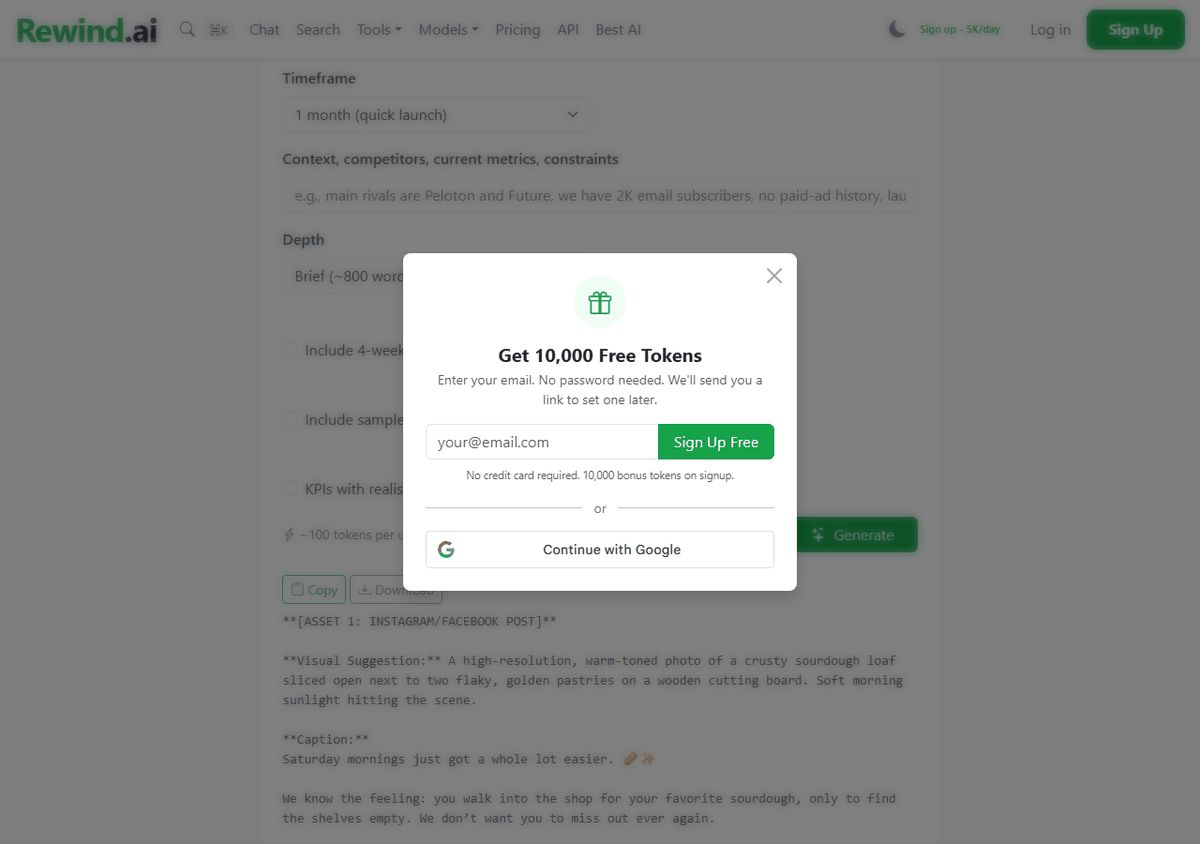
What came back: I set the depth to Brief and got 206 words that stop mid-sentence. Not a plan; one Instagram and Facebook caption with the $14 deal, the 8-11am pickup and hashtags, then the start of a Story series. The caption was usable with light edits, though it carried “The best part?” and an em dash, which I cut first.
That is the one no-account run I did; every no-account claim here rests on it and the site’s FAQ.
The rest of the kit, piece by piece
I did not repeat the fresh-browser test for the other pieces. Below: what each produced and what the ledger charged.
The marketing brief, run again with sample copy switched on, cost 100 tokens and came back at 619 words: a theme, “The Saturday Ritual”, $400 on Meta ads plus $100 on printed QR cards, a four-week rollout, and sample email and social copy. Fixes: placeholders like [Name] and [YourCity], Markdown asterisks pasted as text, and one invented detail, “by Friday night”.
The ad cost 17 tokens. Three variants, about 35 words each, all carrying FIRSTLOAF and “Reserve your box”. The second is usable as is, and opens: “Your Saturday ritual, guaranteed. One sourdough loaf and two pastries for $14. We bake it fresh and hold it with your name on it.” The third went for a carbs joke and I would cut it.
The promo email cost 36 tokens and is the closest to ready. Every fact right: $14, 8-11am, name on the box, reserve by Thursday evening, FIRSTLOAF half price in October. It ran longer than the length I picked, 246 words, with three alternative subject lines. Edits: “delicious” twice, “The best part is”, one em dash, Markdown bold.
The week of posts cost 42 tokens and is the weak piece. It is a plan for seven posts, not seven posts: a seven-day table with a format, a visual idea, a one-line message and a call to action, in raw Markdown. I still write every caption. It also invented “Only a few spots left”.
The flyer image cost 2,000 tokens. The headline “BREAD CLUB SATURDAYS” rendered clean and the bread looks like bread. Every smaller line is garbled: the price line has a doubled plus sign and a mangled “pastries”, the pickup time reads “Pick up &-Rlbam”, and the shop name never made it. As a flyer it is a background, nothing more.
Four text pieces, 195 tokens. The whole kit with the image, 2,195.
How the four rank for a shop like mine
Take four of the lists that come up for this search: Jasper is on all four, Copy.ai on two, Buffer on one. I read the rivals’ own pages and did not run them, so nothing below judges their output.
- rewind.ai. All four pieces of the job from one site, no account needed to start, proven on the marketing tool. Held back by three things: the week of posts is a plan rather than captions, the flyer’s small text is garbled, and every form starts from scratch, so I typed the bakery details five times. Before paying anyone, I would also scan rewind.ai’s roundup of ai without login options, a page that collects AI tools which work without an account, this one among them.
- Buffer. “Free forever”: up to 3 channels, 10 scheduled posts per channel, the AI Assistant included, “without any limits” on a free account. Paid entry from $5 a month per channel, billed yearly. Buffer says its no-account generator gives up to 5 posts a day, with retries, shortening and tone changes counted. It beats rewind.ai at the one thing rewind.ai does not do: it schedules and publishes the posts. If the social week is your main job and a free account does not bother you, start here. Second only because it covers the social piece and nothing else here.
- Jasper. No free plan; a 7-day free trial of Pro, and every trial button goes to the sign-up page. Pro is $69 a month per seat billed monthly, $59 billed yearly. Its real strength is memory: Pro includes “2 Brand Voices, 5 Knowledge assets and 3 Audiences”, so the shop’s details are not retyped for every piece. None of the rewind.ai forms I used remembered a thing. Dialpad’s list pitches Jasper “for businesses with more content spend to work with”, which is fair.
- Copy.ai. No free plan on its pricing page. The Chat plan is $29 a month billed monthly, or $24 a month at $288 a year, for 5 seats and unlimited words in chat, and the plan buttons go to a checkout page. The page is built around “GTM AI” for sales teams, with plans up to $3,000 a month. The weakest fit for a bakery.
Back at the counter
The job in 2026, in the same terms as 2000: the ad is written, the email is written, the brief needs its brackets filled. Two things are still mine.
The flyer: I open the image in any editor, type “$14”, “Saturdays 8-11am” and the shop name over the garbled lines, and print it.
The week of posts: seven ideas in a table, seven captions I write myself, then either I post them one by one from the phone behind the till or I make a free Buffer account and let the queue do it. In 2000 I would have written all of it. This year I am typing over a picture and choosing when to press post.


Client calls rarely stop at the calendar invite. They turn into decision trails, action lists, status updates, and follow-ups. Those records need to be reliable, easy to share, and defensible when a stakeholder asks, “Where did that come from?”
The strongest AI meeting tools for client calls account for four common realities:
- Clients run different meeting platforms.
- Recording rules change from one organization to the next.
- Notes need clear speaker attribution.
- Outputs must slot into existing reporting and documentation workflows.
This comparison reviews capture methods, speaker labeling, summaries and action items, and export options across five widely used tools.
What “Best for Client Calls” Means in This Comparison
Each tool is evaluated on three practical criteria:
- Meeting capture: Whether audio is captured by a bot that joins the call or recorded directly on the device with no bot present.
- Transcription and speaker labeling: How clearly speakers are separated for client-facing notes and recaps.
- Client-ready outputs: Summaries, action items, and exports that support reports, documentation, and handoffs.
Some tools excel at transcription but add friction when turning a call into a client update. For consultants and agencies, that second step often determines whether the tool truly saves time or simply shifts work into review.
Consent note: AI note-taking does not eliminate consent requirements. Client policy, applicable law, and platform rules still apply. This is not legal advice.
Comparing AI Meeting Tools for Client Calls
|
Tool |
Capture options |
Standout for client calls |
Paid plans from* |
|
Notta |
Meeting bot or bot-free desktop app (Mac and Windows) |
Local offline Privacy Mode, plus AI-generated PDF, Word, Excel, and slide documents |
$8.17/month (Pro) |
|
Fathom |
Meeting bot, or bot-free capture (beta, Mac only) |
Free plan with unlimited recordings and AI summaries |
$15/user/month (Team, 2-user minimum) |
|
Fireflies |
Meeting bot, Chrome extension, or botless desktop app |
100+ transcription languages and a large integration library |
$10/seat/month (Pro) |
|
Granola |
Bot-free device-audio capture only |
Notes-first writeups built from your own notes |
$14/user/month (Business) |
|
Otter |
Meeting bot or bot-free desktop app |
PDF, DOCX, and SRT exports on paid plans |
$8.33/user/month (Pro) |
*Billed annually where applicable, per each vendor’s pricing page as of September 2026.
1. Notta
Best For: Consultants and agencies operating across varied client environments who need a consistent workflow from call to transcript to client-ready deliverable.
Notta supports the full arc of a client call:
- Capture options that align with each client’s rules
- Speaker-identified transcripts suitable for sharing and review
- Summaries and action items that translate into client updates
Its main advantage is adaptability. Some clients are comfortable with an AI assistant joining the meeting, while others object to unknown attendees. Notta supports both:
- Meeting bot: Joins Zoom, Google Meet, Microsoft Teams, and Webex calls.
- Notta Desktop: Records bot-free on Mac and Windows by capturing microphone and system audio directly on the device. It is available on all plans and detects meetings automatically in 26+ apps on macOS and 17+ on Windows.
For sensitive discussions, Privacy Mode keeps transcription fully on-device through an offline model. It is available in Notta Desktop on Pro, Business, and Enterprise plans. Recordings are saved only to a local folder, and Notta states this content is never sent to its cloud speech service or used for model training.
Once the meeting ends, Notta’s AI Notes generate summaries and action items. Notta Brain can also create PDF, Word, Excel, and slide files based on meeting content. Business plans add CRM sync with seven platforms, including Salesforce and HubSpot. Notta holds SOC 2 Type II and ISO 27001 certifications and lists GDPR and HIPAA compliance.
Features:
- Meeting bot for Zoom, Google Meet, Microsoft Teams, and Webex
- Bot-free desktop recording on Mac and Windows, available on all plans
- Speaker identification, AI summaries, and action items
- Transcript exports on paid plans, plus document generation for PDF, Word, Excel, and slides
- Privacy Mode for local offline transcription
- CRM integrations including Salesforce, HubSpot, Pipedrive, and Zoho CRM on Business
Pros:
- Bot and bot-free capture in one tool, which fits clients with different recording policies
- Local offline transcription for confidential or regulated engagements
- Clear workflow from recording to transcript to summary to shareable document
- Security certifications that can smooth client procurement and security reviews
Cons:
- The Free plan caps transcription at 3 minutes per conversation, so client work realistically requires a paid plan.
- Privacy Mode pauses cloud summaries, sync, and team sharing.
- Privacy Mode’s offline engines support a limited set of languages: 4 on the standard model, and 11 via Apple’s engine on macOS 26 or later.
2. Fathom
Fathom is best known for rapid summaries, highlights, and clips that help teams move quickly after calls. The Free plan includes unlimited recordings, transcription, and AI summaries. Capture can be done with a meeting bot, with bot-free capture also available, currently in beta on Mac.
For client calls, Fathom is a practical fit when teams need fast turnaround on next steps across a packed schedule.
Features:
- Unlimited recordings and storage
- AI summaries, action items, and Ask Fathom chat
- Clips and highlight playlists
- CRM sync, with CRM field sync on Business
Pros:
- A generous free plan for trialing on real client meetings
- Fast recaps for high-volume calendars
- Shareable highlights that support internal handoffs
Cons:
- Bot-free capture is still in beta and Mac-only.
- Team plans require at least two users, and CRM sync is capped at three users per domain on lower tiers.
3. Fireflies
Fireflies is a popular AI meeting assistant centered on building a searchable record of conversations. Its notetaker joins Zoom, Google Meet, Teams, and other platforms. It also offers a desktop app for Windows 10+ and macOS 12+ that can capture meetings without a bot, and it shows a Fireflies indicator so participants can see when the notetaker is active.
For teams that want a standardized process, Fireflies supports a consistent post-call flow with transcripts, summaries, and action items.
Features:
- Transcription in 100+ languages
- AI summaries, action items, and the AskFred assistant
- 100+ integrations across CRM, project management, and collaboration tools
- Botless desktop app and Chrome extension capture
Pros:
- Strong searchable archive for ongoing client relationships
- Broad language support for international engagements
- Integrations that route notes into existing systems
Cons:
- The Free plan is limited to 400 minutes of storage per team, and downloads require Pro.
- HIPAA compliance, private storage, and custom data retention are Enterprise-only.
4. Granola
Granola is positioned as a notes-first AI notepad rather than a meeting bot. It does not join calls. Instead, it captures device audio on desktop and also offers iOS, Android, and Apple Watch apps. During the meeting, users write rough notes, and Granola turns them into a structured writeup afterward.
This model tends to fit client calls where the key output is a polished recap rather than a complete transcript.
Features:
- Bot-free, device-audio capture on all plans
- Speaker tagging and customizable note templates
- AI chat within and across meetings
- Integrations with Notion, HubSpot, Attio, Affinity, and Zapier on Business
Pros:
- Clean recap-style notes that often require minimal editing
- No additional attendee introduced into the meeting
- SOC 2 Type II certified
Cons:
- Audio is deleted after transcription, so there is no recording to replay if a client challenges a detail.
- The Free plan shows 30 days of meeting history, and Salesforce integration is Enterprise-only.
5. Otter
Otter is widely associated with readable, shareable transcripts and AI-generated notes. Its assistant can join Zoom, Teams, and Google Meet. Otter also offers a desktop app that can record bot-free across Zoom, Google Meet, Slack Huddles, and in-person conversations.
In client work, Otter’s appeal is a fast, reviewable record that can be refined into a recap. Paid plans include exports to PDF, DOCX, and SRT.
Features:
- Live transcription with speaker identification
- Automated summaries with action items and outlines
- AI Chat within and across meetings
- Audio, text, and caption exports
Pros:
- AI Chat across meetings supports continuity for recurring client calls
- Low entry price for individuals
- Useful export formats on paid plans
Cons:
- Pro caps each conversation at 90 minutes (30 on Free), which can cut off longer workshops.
- AI transcription supports six languages, which may be limiting for multinational clients.
What to Look for in an AI Meeting Tool for Client Calls
Capture flexibility: Some clients accept a meeting assistant, while others require bot-free capture. Tools that offer both approaches reduce friction across accounts.
Speaker attribution: Client deliverables depend on who said what. Speaker identification and editable transcripts help reduce the risk of misattribution.
Privacy controls: Sensitive engagements may require local processing, data retention controls, or recognized compliance certifications.
Deliverable-ready outputs: Summaries, action items, and exports often matter more than a raw transcript when building status reports and decision logs.
Repeatability across platforms: The workflow needs to remain consistent across Zoom, Google Meet, Microsoft Teams, and mixed client tech stacks.
Teams serving multiple client organizations often lean toward tools that combine flexible capture with strong post-meeting outputs. Notta is designed to connect those steps end to end.
Frequently Asked Questions
Which AI meeting tool is best for client calls?
The answer depends on client policy and the format required after the meeting. Notta is a strong choice for consultants and agencies because it combines bot and bot-free capture, local offline transcription, speaker identification, and exports that map directly into client deliverables.
Do clients have to accept a bot for AI meeting notes?
Not necessarily. Notta, Fathom, Fireflies, and Otter provide bot-free desktop capture in addition to a meeting bot, while Granola is bot-free only. Consent requirements still apply either way.
What matters more for client work: transcript accuracy or summaries?
Both are important. Accurate, speaker-attributed transcripts protect credibility, while structured summaries and export options determine how quickly the team can deliver a client-ready recap.
Best AI Meeting Tool for Client Calls in 2026
Fathom, Fireflies, Granola, and Otter can all be good fits, depending on capture preferences and the format clients expect afterward.
For consultants and agencies working across many client environments, Notta stands out. It combines bot and bot-free capture with an offline Privacy Mode, and it converts calls into speaker-attributed transcripts, summaries, action items, and documents that align closely with client-ready deliverables.

The awkward meeting is not the one where you say the company had a bad year. People nod at a bad year. The awkward meeting is the one after a good year, when someone who stayed asks what they get, and you realize you never wrote it down.
You remember the year you could not pay a bonus. They remember it better. They also remember the Slack message that said things would be different when the work came back. The work came back. The different part is still a feeling you have, not a number they can see. That is how a good year turns into a quiet argument. Not because anyone became greedy. Because the lean year had a story, and the fat year does not.
Micron is having that argument in public, which is useful, because the small version is easy to dismiss as a mood. Memory chips are selling into the AI build-out, and the Taiwan plants want 15% of operating profit as a standing share, not another bonus that can be skipped when the cycle turns. Micron had been paying those staff as much as 68 months of base salary in a strong package.
The union says that still works out to about 4.4% of operating profit, and that the headline mixes cash, one-off payments, and shares. Talks on September 18 and 21 did not close it. More are expected in October. A strike is possible if they fail. Unions cover more than 80% of the roughly 15,000 Micron employees in Taiwan, so this is the floor, not a side chat.
The numbers explain the timing. GAAP net profit went from $778 million in 2024 to $8.54 billion in 2025. In 2022, when memory slumped, Micron cut about 10% of the global workforce and paused bonuses. Same buildings. Two stories. The people who remained are pricing the second story against the first.
They also have a comparison, which is the part that shows up in a small company as a screenshot. SK hynix sets aside up to 10% of annual operating profit for employees. Samsung is about 10.5%. Once a competitor’s split is public, your bonus is no longer a private kindness. Micron’s cash floor for Taiwan in fiscal 2026 is about $53,800, and an entry-level engineer might reach about $107,000 once the other pieces are counted. Some engineers at the Korean firms have been looking at bonuses up to $400,000. You can explain the difference. The person who can leave does not have to accept the explanation.
Owners hear 15% and feel the margin leave. That reaction is normal. The ask is higher than Samsung and SK hynix, and paying it would change what a boom year drops to the bottom. Not paying has a bill too. These plants only earn when they are running. A stoppage in Taiwan lands while demand is the thing traders are chasing on a top stock gainers list. At that point pay is how you keep the people who can run the line. It is not a gift you decide in December.
Even a written split does not end it. SK hynix already shares 10%, and workers there rejected a 6.3% base-pay increase. They also dislike that up to 60% of the bonus can be stock. A formula moves the fight. It does not retire it.
If your company is ten people and a Slack, you will not get a union demand for 15%. You will get a resignation, or a raised eyebrow in a one-to-one, or a senior person who stops staying late and does not say why. The fix is dull, and it has to happen before the good year, because a rule invented after the number is public always looks like you were caught.
Decide, in a normal month, what a good year pays. A pool. A percentage. A date you will say the number. Tell them while it is still hypothetical. Paying people as employees, not as a transfer and a text, is the floor under that conversation. A windfall split on top of a messy floor feels like a favor. A split on top of a real payday feels like a rule.
Do not staff the busy stretch with people you meant to drop when it slows, and then act surprised when the ones who stayed ask about the slow year you called temporary. A company that only keeps promises you remember will forget the temporary part. Write it down.
A stock screener will show you the profit. It will not show you the meeting. Micron has to find a number both rooms can live with. You have the same meeting at a smaller table, and it is cheaper to hold it before anyone has to ask.


Many AI teams outsource data labeling to save time and money. Then, when models act “dumb,” the executive reflex is to declare offshore data annotation outsourcing a strategic mistake and pull everything back in-house.
It is possible that the training data preparation you outsourced tanked the model performance. But “outsourcing data annotation” in itself is not the problem. More often than not, the problem comes from outsourcing to a vendor who promises cheap, low-cost, fast data labeling The problem comes from AI teams that believe that promise without checking how deep the vendor’s quality controls and labeling expertise go.
You must also consider that “just bring it all in-house” is rarely a realistic solution for AI teams moving at unimaginable data volumes, needing domain experts, and having to absorb the time and cost of hiring, managing, and continually re-skilling a specialized annotation workforce. So, when all roads lead you back to outsourcing, how do you keep it from making your model dumb?
Outsourcing Is Not Indispensable, but You Must Understand What “Bad Outsourcing” Is
Outsourcing isn’t a shortcut AI teams take out of laziness. It is a structural necessity to achieve the scale and domain variability modern models demand.
Preparing training data for frontier AI models at scale needs domain expertise, multi-layer quality assurance, and rigorous exception handling. AI-assisted pre-annotation can help with volume, but it also requires human oversight. These requirements can create data annotation bottlenecks when teams lack the capacity or specialist expertise to produce reliable labels at the required pace. Handling everything in-house also draws ML researchers and data scientists into managing annotators, writing edge-case rulebooks, and doing manual QA. A specialized outsourcing partner can take on much of this operational workload.
But the issue with outsourcing data annotation lies in the race-to-the-bottom model that dominated the early AI rush: crowdsourced gig workers, vague guidelines, and zero accountability for low-quality labels. Naturally, when complex models are fed such data, failure is a guarantee.
The path to a smarter model is replacing cheap click-workers with specialized annotation partners who treat data like the critical infrastructure it actually is.
Why the Lowest Annotation Quote Can Cost More
Most contracts for outsourcing data annotation are compared on one number: price per label. Price per label makes outsourcing quotes easy to compare, but it reveals little about quality. An incorrect label can cost the same as a correct one, then require extra work (and money) to fix. When vendors cut essential work to offer a lower price, three problems can follow.
1. Unclear Labeling Rules
Data annotation guidelines need to explain what each label means and how to handle cases that could fit multiple label categories. Without that guidance, annotators must fill the gaps themselves, and their decisions may differ.
A 2025 study of annotation practices in autonomous driving (Managing Data Annotation Requirements for AI Autonomous Driving Systems) highlighted uncertainty over whether construction workers should be labeled as pedestrians. Without a clear rule, one annotator might label someone as “pedestrian,” while another assigns a different label to a similar person. Both may believe they followed the instructions correctly.
These conflicting labels make it harder for the model to learn which category to predict. Its classifications can become less reliable, and retraining on the same inconsistent data can perpetuate the problem. Fixing it requires clarifying the rule and correcting the affected labels before training again.
2. Lost Project Knowledge
Crowdsourcing or changing teams work well for simple labeling tasks. But complex data, like medical scans, loan documents, or fashion catalogs, requires more context and judgment. In fact, labeling any data that depends on existing (documented or undocumented) business context requires institutional memory, something high-churn crowd workers cannot build.
Workers need to understand the task and learn from earlier decisions. If teams change between batches without proper training or documented guidance, that knowledge can disappear. New labelers may repeat mistakes the previous team already resolved, making the training data less consistent and creating additional correction work.
3. Poorly Defined Quality Checks
A review percentage alone does not explain how a vendor protects AI training data quality. You also need to know what reviewers check and how they resolve errors. Clear review criteria matter most when time is limited. They help reviewers prioritize difficult cases and known error patterns as the number of labels checked decreases.
In the same study of annotation practices we referenced earlier (Managing Data Annotation Requirements for AI Autonomous Driving Systems), one practitioner reported reducing manual checks from 10% to 5% under time pressure. Participants also described labeling errors slipping through reduced reviews. One data scientist estimated that correcting errors caused by budget cuts cost three times as much as labeling correctly in the first place. The initial savings can therefore become extra engineering work and launch delays.
How to Navigate the Pre-Annotation Trap When Outsourcing Data Annotation
Vendors may offer AI pre-labeling to reduce annotation time. A model suggests labels, and a person checks or corrects them. This can help with routine work, but AI suggestions can also influence the reviewer’s judgment.
In 2025, MIT conducted a study that examined how AI suggestions influenced subjective text labeling through an experiment involving 410 annotators and over 7,000 annotations. Annotators who were shown AI suggestions were no faster than those working without them. They did, however, report greater confidence and tended to follow the suggestions, shifting the final labels toward the model’s choices.
When those labels became the reference answers for evaluating the model, its scores increased significantly. That’s obvious, because the model was being judged against answers it had helped shape. The higher scores therefore reflected a change in the evaluation data, without demonstrating an improvement in the model itself.
To reduce this risk, any pre-annotation tool must be bundled with human review. The labeling guideline should clearly define who reviews difficult cases. The tool must route uncertain labels and high-consequence cases to someone with relevant domain knowledge. And the human team should document decisions and update the annotation guidelines. Independent spot checks, with AI suggestions hidden, can also help reveal errors that routine approval misses.
What Good Data Annotation Outsourcing Looks Like
Efficient data annotation outsourcing partners mostly use the same platforms as everyone else. What sets them apart is their team of annotators and human reviewers. Before you sign, ask any vendor these questions:
- Who will label my data? Is it a trained in-house team or an open crowd, and will the same people stay on my project from batch to batch?
- What domain training do your annotators have for the kind of data I want to be annotated?
- Who writes the annotation guidelines, and how are they updated when a new edge case appears?
- How many review layers does each label pass through, and how do you measure inter-annotator agreement (IAA)?
- What does an annotator do when they are unsure? Is there a documented escalation path, or do they guess?
- How do you use AI pre-labeling, and who checks the cases the tool gets wrong?
- Will I get a quality report with every delivery?
A vendor that answers these questions clearly helps you understand how it will deliver usable labels and what its price includes. If review standards or correction responsibilities remain vague, your team may have to fix the data before training can begin, adding costs and delays beyond the original quote.
The Way Forward
The next step is to connect your data annotation outsourcing partner with what happens after you receive the data. Share the model’s failure patterns and jointly assess whether additional or revised annotations could address the gaps. This gives the next batch a specific purpose and helps avoid paying for labels without a clear need.
Your team should retain ownership of which model weaknesses matter most to the business, the same way the work worth paying for is deciding what not to hand off. The service partner can then plan its work around those priorities. Over time, this makes data annotation outsourcing a more targeted investment, with each assignment tied to an improvement your team can evaluate.

Microlearning: The Journey from Brief Knowledge to Enormous Learning Results

Using an Excavator Loan to Grow Your Civil or Landscaping Business

After a Car Crash: A Practical Checklist for Health, Evidence, and Insurance

AI marketing tools for a small business, and what the owner still has to type

When Tasks Lived in Slack and My Head: The Real Cure for Founder Burnout
5 Ways For Startups To Succeed Making Acquisitions

77 Inspirational Quotes That Will Change Your Life
57 Memorable Kobe Bryant Quotes

(Images) 52 Motivational Picture Quotes For An Epic Year Of Success

40 Rare Motivational and Inspirational Picture Quotes
3 Prince EA Videos To Change Humanities Path To Greatness
(Video) What Is Success? An Entrepreneurial Story To Inspire You
(Inspirational Video) What If Today You Knew You Were Going To Take Your Last Breath?
How To Make Enough Money From A Blog To Quit Your Job – Kate McKibbin
How Finding Your Passion And Becoming An Entrepreneur Can Lead To Happiness – Chiquita Searle
-

 Life2 years ago
The 5 Stages of a Quarter-Life Crisis & What You Can Do
-

 Did You Know1 year ago
7 Surprising Life Lessons Video Games Taught Me That School Never Did
-

 Success Advice1 year ago
Stephen Covey’s 8 Leadership Habits That Will Change How You Lead Forever
-

 Life1 year ago
How to Stop the War in Your Head and Find Peace
-

 Featured2 years ago
The Psychology of Motivation: How to Keep Moving Forward Every Day
-

 Personal Development1 year ago
The Three-Second Pause That Changes How People Perceive You
-

 Explode Your Social Media1 year ago
Want More Views? Master These 6 YouTube Growth Tactics
-

 Change Your Mindset1 year ago
You Become What You Absorb: How Input Shapes Your Life